Do you know that WhatsApp provides you the facility to show your DP (Profile Picture) whenever you want and hide it whenever you want. Most of the people keep their profile in WhatsApp. Boys especially post their own profiles, but girls also post profiles of other objects.
If you do not want to remove your WhatsApp DP but just want to hide it, then my friend it is absolutely possible to do so. Let us know how to hide your DP on WhatsApp?
How to hide your profile picture (DP) on WhatsApp?
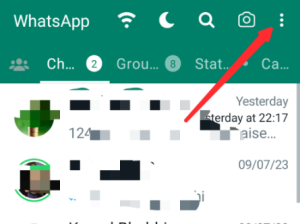
1: First of all, open WhatsApp in your phone and click on 3dot on the right side.
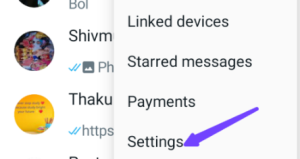 4: Now after coming to the settings, you have to click on the privacy option.
 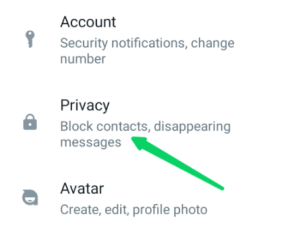 5: Now after coming to privacy, here you have to click on the profile photo option.
 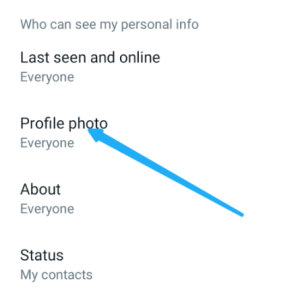 6: Now you see four types of options given below.
- Everyone: If you check this option, your profile photo is visible to all your WhatsApp users. Even if someone saves your WhatsApp number in his mobile and sees it, he will also see your profile photo.
- My Contact: After clicking on this option, the people whose number you have saved on WhatsApp and the people who have saved your number can see your WhatsApp DP.
- My Contact Except: By clicking on this option, only the friends you select will be able to see your WhatsApp DP.
- Nobody: If you check this box, then no one will be able to see your WhatsApp DP.
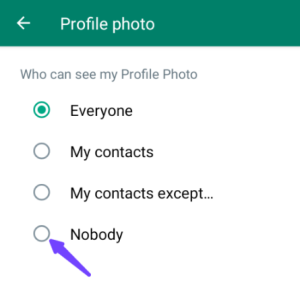 7: In this way, out of the above four options, you have to check mark the fourth option called Nobody and then come back to WhatsApp. After this, if you want, you can open any other WhatsApp profile and see your WhatsApp ID in it, but you will not see your WhatsApp DP there.
Also read: