If you too have forgotten the lock of Instagram on your phone and want to break the lock of Instagram! So that is what is mentioned in this article. Because many times we lock Instagram due to our privacy. So that no one can access our Instagram chat and other activities etc.
But after installing the lock, sometimes we forget its PIN, pattern or password due to which we feel that now we have to uninstall the Instagram app. But it is not so, you can break Instagram’s app lock even without uninstalling the app. By using the methods mentioned below, you will be able to break the lock of Instagram on your own or someone else’s phone.
How to break Instagram lock? (on default app lock)
In most Android phones, app lock is now provided by the company itself, you do not need to download third party app lock. So if the Instagram application is locked with the same default app lock then you can remove its lock by following the steps mentioned below.
1First of all, go to the Settings of the phone,
2Now after this scroll down again and go to Security, Now click on the option called Privacy & App Encryption here,
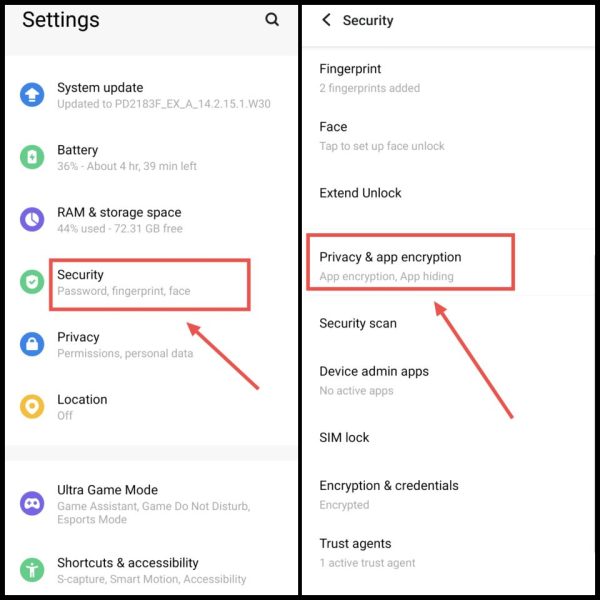
Note: If you do not find this option by this name in your phone, then you can go to Settings and search “App Lock” or “App Encryption” in the search box.
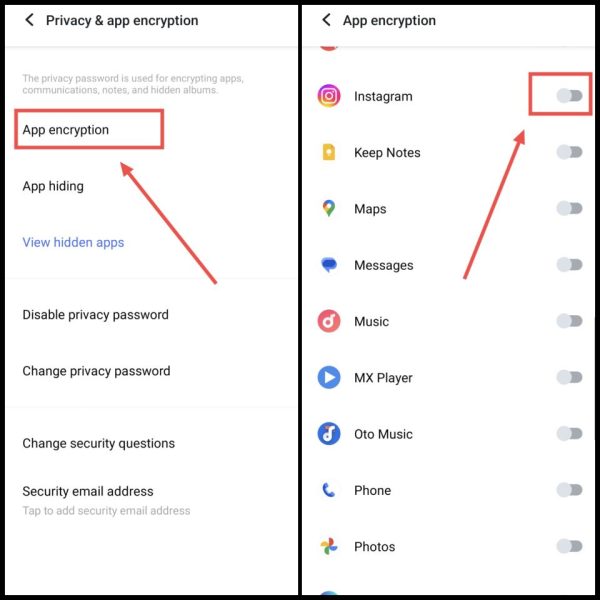
3. Now here after that click on App Encryption. Now scroll down and disable the toggle given next to Instagram. Due to which the lock of Instagram will be removed.
How to break Instagram lock? (on third party app lock)
If Instagram has been locked with the help of a third party app lock application, then you can remove the lock from Instagram for some time by force stopping that third party app lock application.
first way
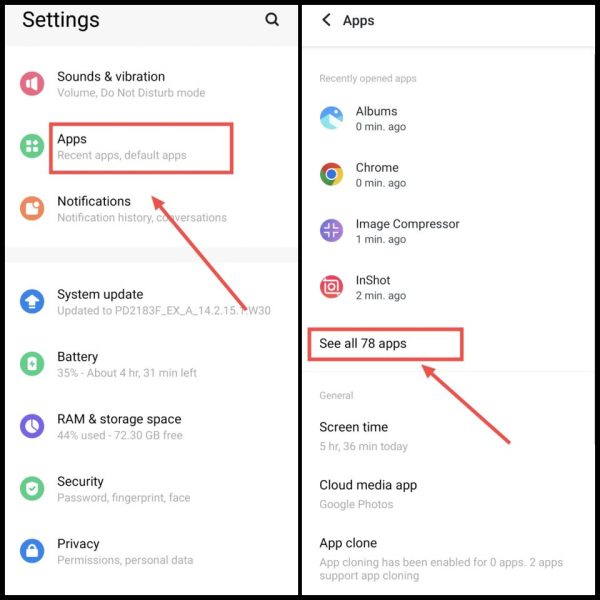
1First of all you go to the settings of your phone,
2Now after this again scroll here and click on Apps, Then after that click on See All Apps,
3After this, go to the app called App Lock, Then after that click on Force Stop,
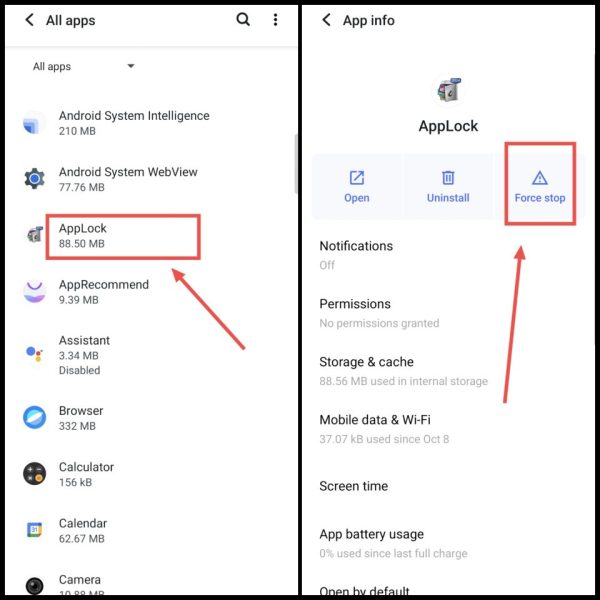
4Now the app lock will stop working and if Instagram is locked by third party app lock, it will also be removed,
another way
1First of all, go to the homescreen of your phone,
2Now here you have to long press on the App Lock app, After which then click on the App Info icon, Now after this, click on the button called Force Stop,
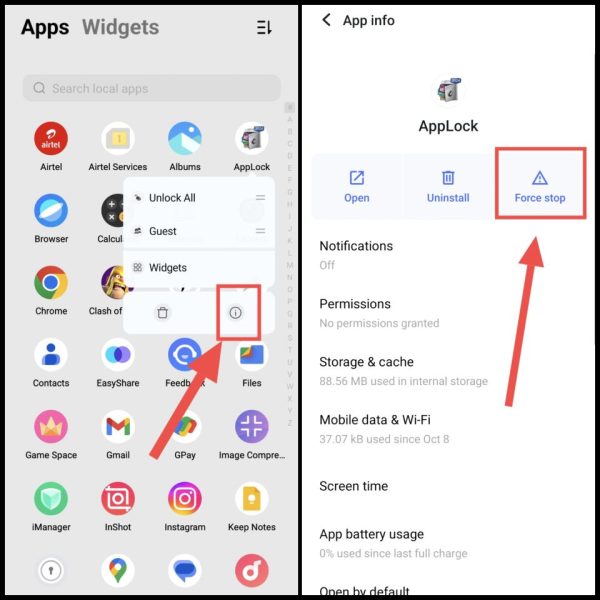
3Now after this, whatever lock is installed on Instagram will be removed,
How to remove app lock on Instagram?
If you want to remove the lock from Instagram permanently and not for some time, then you can also uninstall the third party app lock application. Due to which the lock on Instagram as well as on other apps will also be removed.
first way
1First of all go to Settings of your phone,
2Now after this you tap on Apps here, Then now click on the option called See All Apps,
3Then after that select App Lock from here, Now again click on the Uninstall button,
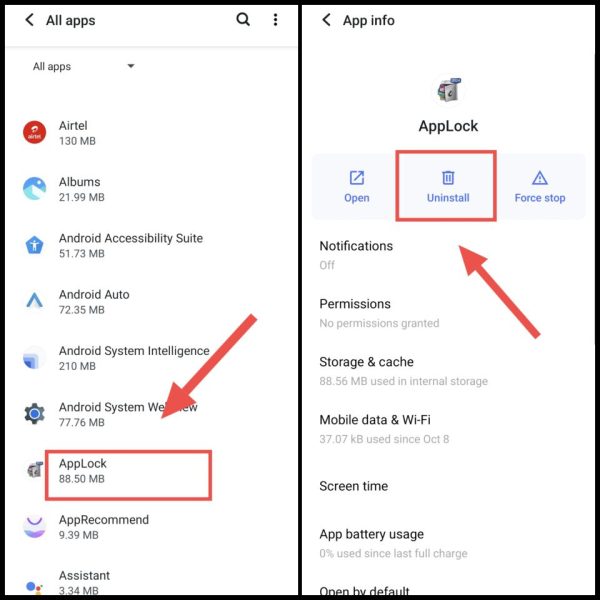
4Then now as soon as you click on OK, your app lock will be uninstalled and the lock from Instagram will also be broken,
another way
1First of all, go to the app list on the homepage of your phone,
2Now after this, long press on AppLock and then click on the Uninstall icon, After that click on Uninstall again,
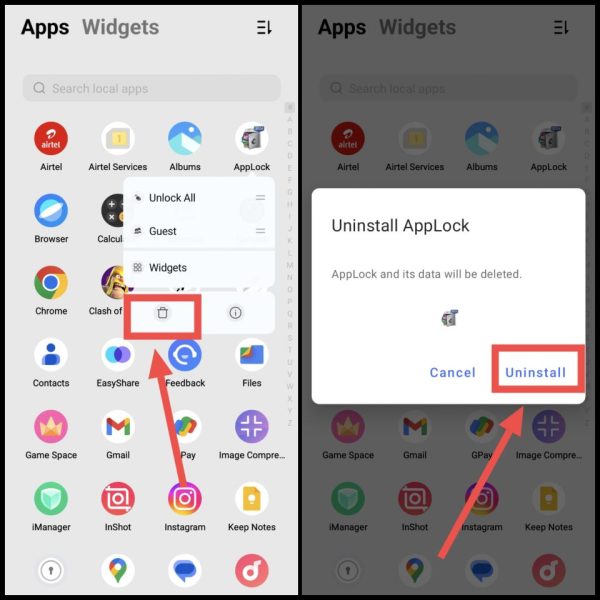
3This will uninstall the third party app lock, Besides, the lock placed by him on Instagram will also be automatically removed,
How to disable app lock in Instagram?
If you want to remove the lock only from Instagram in your phone and leave other apps on, then you can go to the third party app lock application and untick Instagram.
1First of all, open the third party app lock application downloaded in your phone, You can also find this application by searching “App Lock” and then open it,
2Now you have to enter App Lock and come into the app, After which now click on the lock icon given next to Instagram, By doing this the lock will be removed from Instagram,
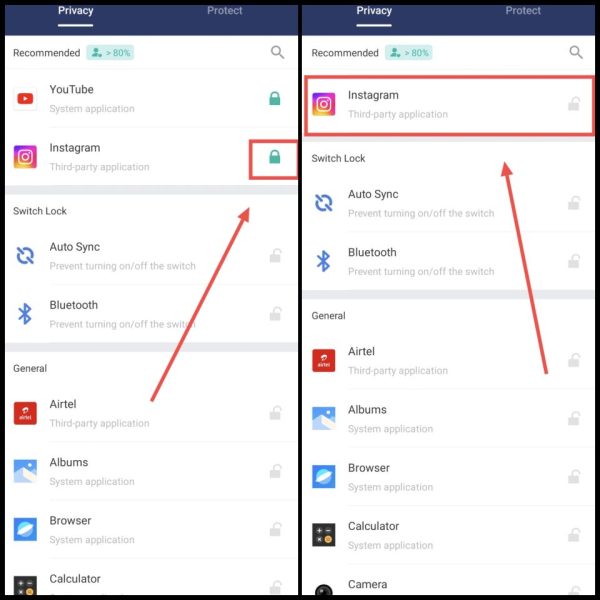
3Now you can access Instagram app without app lock,
In this way you can remove the lock on Instagram from your or anyone else’s phone. If you face any problem in any of the steps, you can ask by commenting below.
Also read: