
If you want to open the lock of your Vivo mobile, then for this you have to hard reset the mobile by taking it to recovery mode. Hard resetting clears all the data on your mobile, meaning all your photos, videos, apps and settings will be deleted. This method works not only for Vivo but to remove lock in any brand of mobile. But keep in mind that this will completely erase the data.
While performing a hard reset on some Vivo phones, it may ask for the password or lock screen code in recovery mode, which makes it a bit difficult to remove the lock. But in this article, I will tell you some easy and effective ways by which you can open the lock of your Vivo phone even without any password. Also, I will also tell you some codes using which you can easily bring your Vivo mobile to recovery mode and do hard reset.
How to break VIVO phone lock?
1: First of all click on emergency call in your mobile. Now you are the first *#36529# Enter the code. After this click on the call button shown below. Similarly, dial the remaining 2 codes.
- Second code: *#02583#
- Third code: 3680
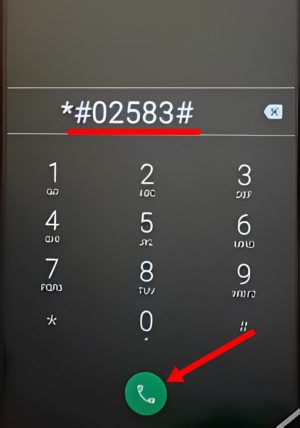
2: After this switch off the mobile. Then take the mobile to recovery mode. For this mobile Volume Up + Power Button Long press .
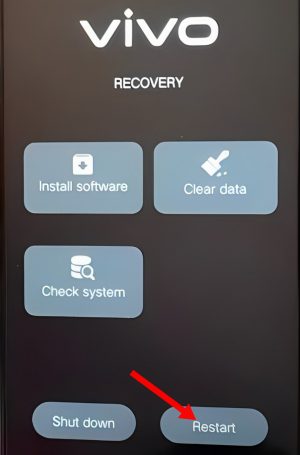
3: After this, to enter Recovery Mode, click on the Recovery Mode button shown below and select it.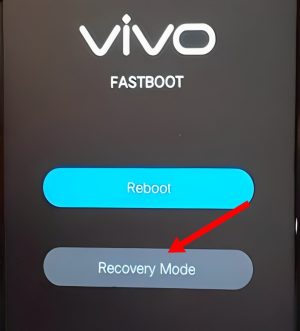
Note: In this mode, use Volume Up and Volume Down buttons to move the cursor up and down. Use the Power button to select the option.
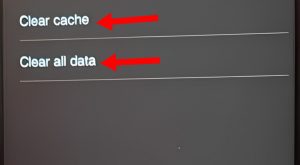
4: Now click on the Check System button. Now the software will check the lock installed on your mobile. After this click on the Ok button.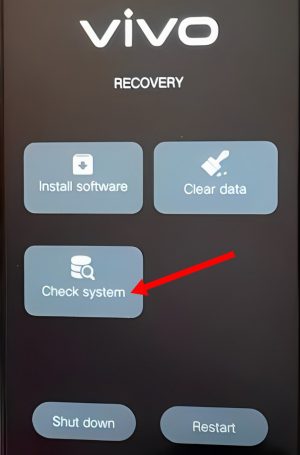 5: After this you click on the Clear Data button. First of all click on Clear Cache button. Now click on Return button.
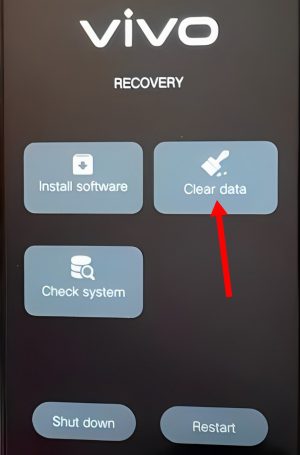 6: After this click on Clear All Data button. Now click on Ok button in the pop up. After the data is cleared, click on the return button.
 7: After this, restart your mobile by clicking on the Restart button.
 8: After this select your country and click on the Next button. Now you can complete the entire set up easily. Your mobile will be completely unlocked.
By using this method you can easily break the lock of any Vivo mobile. Don’t forget to use the codes mentioned in the beginning. If you do not use codes, the mobile will definitely ask for your password or PIN while clearing the data. And in such a situation you will not be able to break the lock of Vivo mobile.
Also read: