
For any reason, if you want to stop some or all incoming calls in your phone, then in today’s post I will tell you 3 easy ways to stop any incoming call.
Suppose you do some work in which you cannot take calls from anyone. So by blocking incoming calls, you can also remove the problems that come in the way of your work. There are many ways to stop incoming calls, but the best methods have been told to you in this post.
How to turn off incoming call from mobile settings?
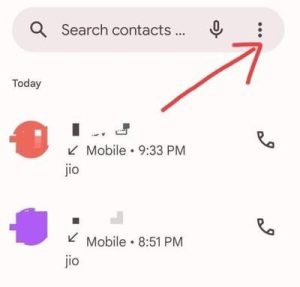
Step 1. First of all open the dialer pad of your phone and then Click on the 3 dots on the top right.
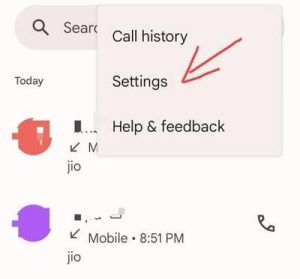
Step 2. After this a small menu will appear in front of you. In which click on settings.
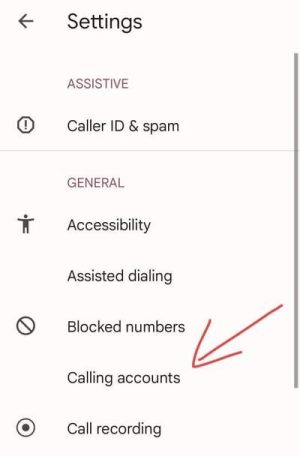
Step 3. Now here you have to click on the option of calling accounts.
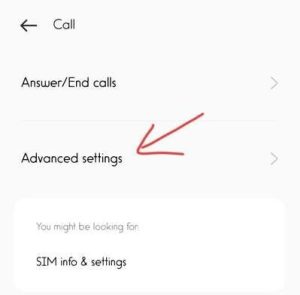
Step 4. After clicking on Calling accounts, now you have to click on Advance settings.
Step 5. Now you will see some call related options like call forwarding, call barring etc. You have to click on call barring among them.
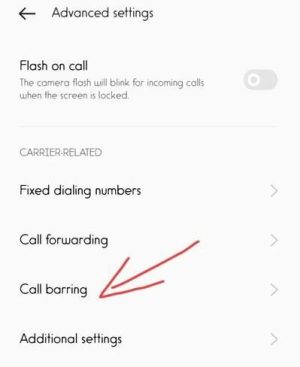
Step 6. When you click on the call barring option, you will see the SIM in your mobile here. So now you have to click on the SIM whose incoming call you want to stop.
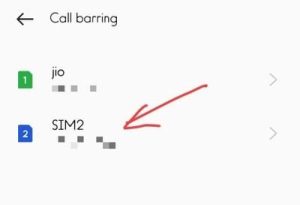
Step 7. Now you will get to see the status of reading settings. Now here you have to click on Reject All incoming Calls.
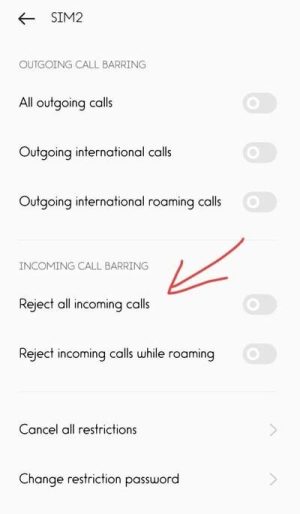
Step 8. After this you have to enter your mobile password for call barring. After entering the password, you have to leave it for a few seconds to update.
Step 9. After the update is complete, your incoming calls will stop.
Note – Actually, I have told you this method from Oppo phone. In such a situation, those who have an Oppo phone can easily stop incoming calls on their phone in this way. But if you have a phone of any other company, then according to the settings of your phone, go to the call barring option and follow the remaining steps.
How to turn off incoming call from mobile settings?
If you have stopped incoming calls in your phone from mobile settings, but if you want to resume incoming calls later. So by following all the steps mentioned above, you have to come to the call barring option and then turn off reject all incoming calls.
How to block incoming call with Call Barring Code?
Not only mobile settings, if you want, you can also stop incoming calls in the phone with the help of code. No matter which company’s SIM you have in your mobile, Jio, Airtel, Vi, BSNL, you can stop incoming calls by using the code.
- So to stop incoming calls in this way, you have to go to the dialer of your mobile.
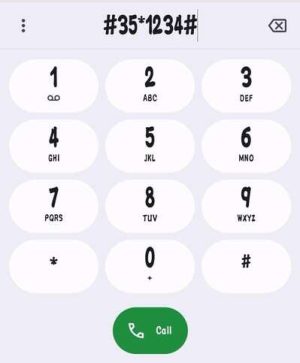
- After going to Dialer, you have to enter *35*call barring password#.
Note – Most everyone has 1234 call barring password in their phone. So you can use this password but if this password does not work in your phone. Then you can use 0000 call barring password.
- That means you have to go to the dialer and type *35*1234# or *35*0000#.
- After entering this USSD code, you have to click on the call button.
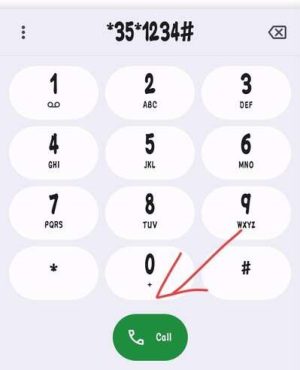
Keep in mind that if you use 2 SIMs in your mobile, then you have to call from the number in which you want to stop incoming calls.
How to turn on incoming call with Call Barring code?
If you have stopped incoming calls in your phone in the above mentioned way but you suddenly need to start incoming calls in the phone. So in such a situation you have to dial #35*call barring password#. By doing this your incoming call which has been stopped will start again.
How to block incoming call with Call Blocker App?
1. To block everyone’s number and stop their incoming calls, first of all you have to do it on your mobile. Call blocker You have to download the app and open it.
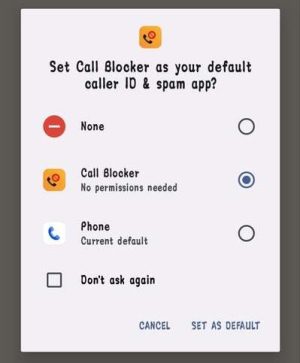
2. After opening the app, you have to make this application your default caller ID. By clicking on Set as default.
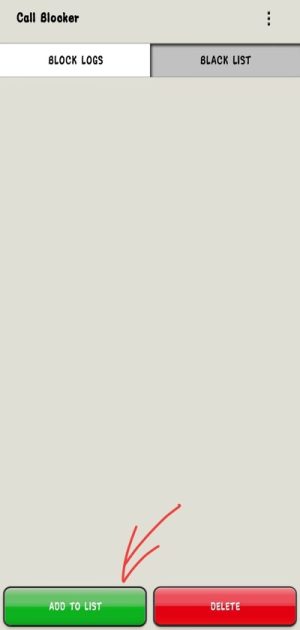
 3. Now you have to click on the black list option below. Click on Add to black list button.
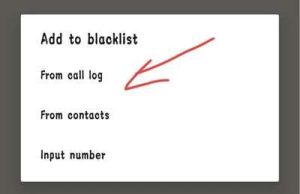
 4. Now a small pop up will open in front of you, here you will see the number sources for blacklisting. So you have to block incoming calls, so you have to click on the From call log button.
 5. After clicking on this button, all the incoming calls in your call log will appear here. So here you have to select the select all button visible on the top right side.
6. But when all the numbers, especially the incoming numbers, are selected, then you have to click on the Add to blacklist button.
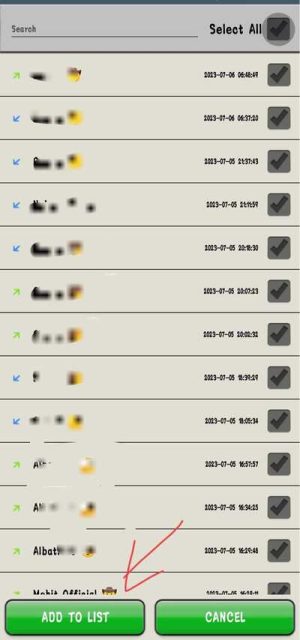
After clicking on this button, all the numbers present in your mobile will be blocked. After which no one will be able to call you.
Frequently Asked Questions;
The code to end incoming call is *35#.
By the way, you can stop incoming calls yourself by using the method mentioned above. But if you do not recharge your phone. So the incoming calls on your phone will be stopped by the company within 7 to 10 days.
Yes of course you can block all incoming calls!
To stop calls from a company, you can block their number.