
Whenever you send money to someone through the PhonePe app or someone sends money to you, its complete details are saved in the transaction history of PhonePe. You can see this history anytime and it also acts as a proof if needed. But many times people want to delete PhonePe history for their privacy or for some other reason. If you also want to delete your PhonePe transaction history, then in this post PhonePe Ki History Kaise Delete Kare? Its complete method has been explained, along with this we will also know whether the history can be permanently deleted in PhonePe or not.
Before that, let us understand a little what is transaction history in PhonePe? And how can it be seen?
What is PhonePe History?
The record of all the transactions done by you on the PhonePe app is called PhonePe History. With the help of the history feature of PhonePe app, you can see to whom, when and how much money you have sent, and you can also check the record of the money received in PhonePe. Also, if you have sent money to someone on UPI ID or phone number, then you also get the information about it.
How to see PhonePe History?
Step1: To see the transaction history of PhonePe, first of all you have to go to your mobile. Phone App Have to open.
Step2: After opening the app, you will see an icon of history on the bottom right side, click on it.
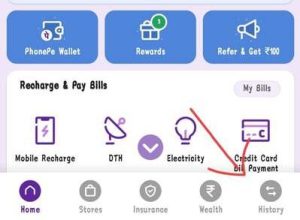
Step3: As soon as you click on the history icon, the complete history of Phonepe will appear in front of you.
In this way you can see your complete transaction history on Phonepe. But if you want to see the history of transactions done with any one person, then you will have to click on the transaction of that person. Along with this, you can see the history of some selected months or categories, payment types etc. as per your choice by applying filters here. And now in the new version of PhonePe, you also get the option to download the history in the form of statement.
If for some reason you want to delete your entire or selected PhonePe transaction history, then I have given two methods below by which you can delete it completely or hide it for some time.
Related: How to extract details from Transaction ID?
How to delete PhonePe history?
Step1: First of all you have to open the Phonepe App in your mobile, after that you have to click on the last option of the menu seen below, history.
Step2: After clicking on History, the complete transaction history of PhonePe will appear in front of you. So click on the transaction history you want to delete.

Step3: As soon as you click on individual transaction history, a new page will open in front of you. In this page you will also see an option of contact Phonepe support. You click on that option.

Step4: After clicking on that option, you will have to write a message and send it to contact support. In the message you will have to write something like this – “Due to some reasons, I want to delete this transaction history”. If you want, instead of writing this message, you can write the message giving some reason of your own.
Step5: By sending this message, a ticket will be created for you and PhonePe’s contact support team will confirm your message. If you confirm the message, your request will go ahead.
Step6: After this PhonePe will analyze the request sent by you. If your request is correct! So your request will be accepted and that transaction will be deleted from your PhonePe history.
If you do not want to delete your PhonePe history, or are unable to delete it for some reason, then you can hide it from your PhonePe app for some time.
How to Hide PhonePe History?
Well, I have told you above how to delete phone history. But you face some kind of problem in deleting the phone history using that method. So according to your need, you can temporarily delete the phone’s history or even remove it for some time. But to do this you will have to follow the steps given below properly –
Step1: Open the PhonePe app and then go to History.
Step2: Now as you can see above, you will be seeing an option of month. You have to click on that option.
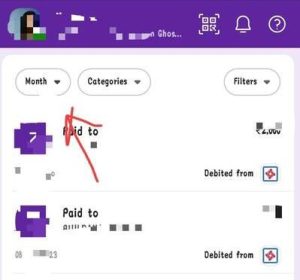
Step3: In this page you will see months. Select only the history of the month for which you want to keep the history. And then click on the apply button below.

Step4: Now all your transaction history will disappear except the history of the month you selected.
In this way, you can keep as much history as you want on PhonePe and make the rest of the history disappear. By doing this you will be able to make your Phonepe history disappear from Phonepe without deleting the history of Phonepe.
Hope I hope that now you have got the complete information about PhonePe History Delete (PhonePe Ki History Kaise Delete Kare?), if you still have any question then you can ask by commenting below.
Also read:
Related questions
The option to delete chat history is not currently available in the PhonePe app. For this, you can contact the customer support team of PhonePe, who can help you in deleting your chat history.
No, you cannot delete your bank transaction history. All your transaction records are kept securely by the bank, and form part of your account history. Although you can download or print your account statements, they cannot be removed from the Bank’s systems or servers.






![How to know location from mobile number online in 1 minute [2025]](https://www.techtrends.blog/wp-content/uploads/2026/01/How-to-know-location-from-mobile-number-online-in-1-330x220.png)