
If your keypad mobile is locked and you do not remember its password, then there is no need to panic. In this post we will tell you how the lock of any keypad mobile can be broken. Whether your mobile is Intex, Micromax, Nokia, Panasonic, Gionee or any China keypad phone, the method to open the lock of all of them is explained here.
Nowadays, people keep keypad phones locked for their privacy, so that no one else can open their phone. But many times we ourselves forget the password and the phone gets locked. In such a situation there is a need to open the phone.
In such a situation, you will have to adopt some easy methods, by which you can open the lock of your keypad mobile yourself. Some common methods include:
- Trying the default code (like 0000 or 1234)
- Performing a factory reset (which will erase all data, but the phone will restart)
- Some phones have special button presses, such as pressing the volume button and the power button simultaneously
With these methods you can open the lock of most keypad mobiles. Further in the post, all these methods are explained in detail so that you can unlock your mobile easily.
You can use the methods mentioned below to unlock your mobile. Breaking the lock of someone else’s mobile without permission is illegal, for which you can also be punished.
How to break keypad mobile lock?
Hard reset code is mainly used to unlock the keypad mobile. Apart from this, if the keypad mobile is still not getting unlocked then in such a situation it can be reset by the model number of that device.
Many types of companies like Micromax Intex Samsung Nokia etc. mobiles provide reset code according to their model so that the phone can be unlocked.
How to break the lock of SAMSUNG Keypad Mobile?
To unlock Samsung Keypad Mobile *2767*3825# Dial up. On dialing this code in mobile, you will receive a notification in your mobile. Here you have to click on OK, after which you will be given a warning. After doing OK, your Samsung Keypad mobile is now ready to be completely reset and all the data present in the phone, Contacts, Messages, etc. will be deleted.
Apart from this, you can also use these codes to break the lock of Samsung keypad mobile.
- *7465625*638*00000000*00000000#
- #7465625*638*00000000#
This is the main code which is mostly used to hard reset Samsung keypad mobile.
How to break the lock of NOKIA Keypad Mobile?
If you also have a Nokia Keypad mobile and have forgotten its password, then you can use this code in your phone. *#7780# Dial up. By using this code, the lock of your Nokia Keypad mobile will be broken and no data will be deleted.
If you hard reset code or Factory Reset Code If you want to break the lock of your Nokia mobile keypad with the help of then you can use this code *#7370# Can use. But by using this, all the data of your Nokia Keypad mobile like Contacts, Messages, Call Log, etc. will be deleted.
Apart from this, if your Nokia model is Nokia Symbian 60 V1 (3600, 3620, 3650, 3660, N- Gage, 7650) then you can do the reset or break the lock. #7780##7370# Use this code.
How to break the lock of LG Keypad Mobile?
Breaking the lock of LG keypad mobile is also very easy because for this also a default code has been given by the company, by dialing which you can easily break the lock of your keypad mobile which is as follows.
Apart from this, if you want to Hard Reset your LG Keypad mobile or the lock is not breaking using the code mentioned above, then you will be able to break the lock of your LG Keypad mobile through this Hard Reset Code. For this, dial *6861# in mobile, but during its use, important data like Contacts, Call Log, Messages etc. may get deleted.
How to break the lock of LAVA keypad mobile?
If you want to break the lock of Lava keypad mobile, then for this also there is the following default code using which the lock of any keypad mobile of Lava can be broken.
How to break the lock of Panasonic, Gionee, Intex, Micromax, Sony, Motorola and any keypad mobile in 1 minute?
The default codes of these companies are almost the same, so if your keypad mobile is of any one of the companies like Micromax, Sony, Motorola, Panasonic, Gionee, etc. then you should try to break the lock of your keypad mobile by dialing the following default code, any of these will break the lock of your mobile.
How to break the lock of any keypad mobile from computer?
If Hard Reset codes are not working in your keypad mobile, then you can use this method. But for this you will need a laptop or windows pc.
#1: First of all you have to download Miracle Box software in your Windows PC.
Step2: Now you have to open Miracle Box software in run as administrator mode.
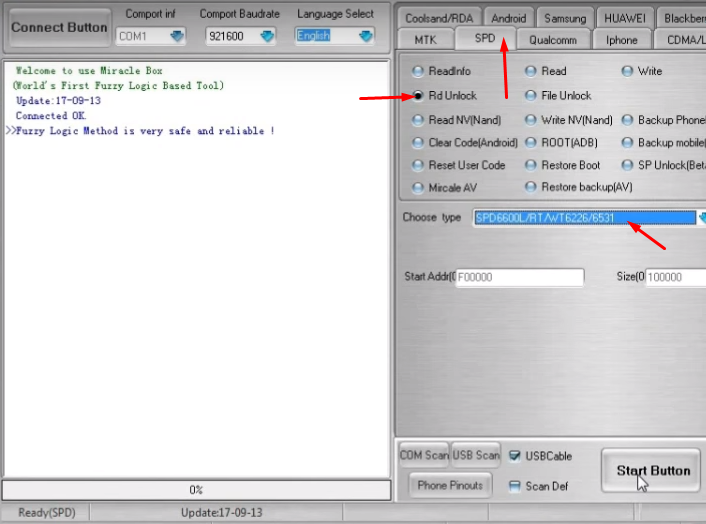
- Select SPD option in the above tabs.
- Choose RD Unlock in SPD tab.
- In Choose Type, choose SPD6600L/RT/WT6226/6531.
- Then click on Start Button.
NOTE1: These options may change according to your device, I have unlocked lava arc12+ phone in this post.
NOTE2: Before following the steps, install the USB driver according to your phone in your laptop and PC.
#3: Now after clicking on the start button, you will see steps to connect the phone.
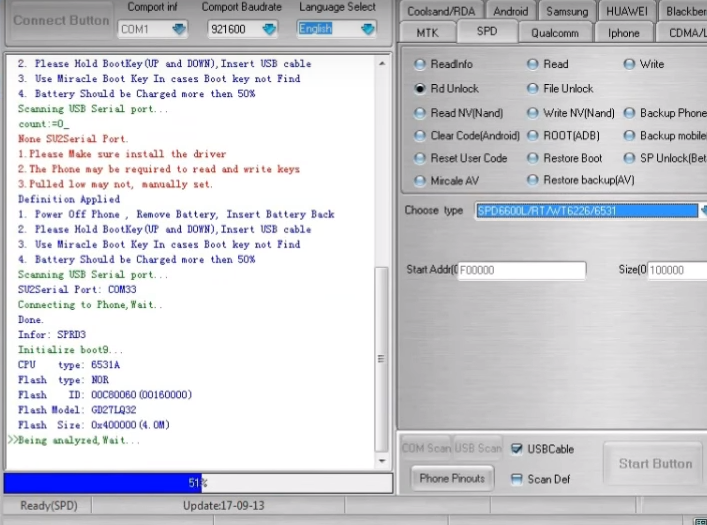
Step4: Now connect your phone to your computer according to the points coming in this software. (for example: remove the battery and insert it again, connect the usb cable and press ok button.)
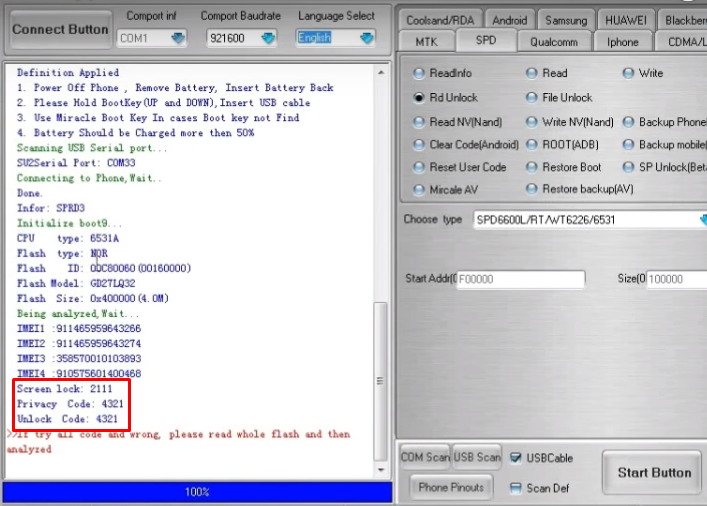
Step5: After your phone is successfully connected, 100% will be written in blue color below. And there you will get your password.
So in this way you can easily break the lock of any of your keypad mobile and unlock it.







![How to know location from mobile number online in 1 minute [2025]](https://www.techtrends.blog/wp-content/uploads/2026/01/How-to-know-location-from-mobile-number-online-in-1-330x220.png)