When you call someone from Jio SIM! So that call history gets saved in Jio application. Also, when you called whom and for how long, all that information is automatically stored in the call history of Jio app. But sometimes we do not want to show our call history to anyone! Because of which we delete our call history.
But many Jio users do not know how to delete call history from My Jio App. Also, there is no such deletion option officially available on Jio app. But still you can request to delete the call history of Jio app with the help of Customer Care.
How to delete call history from My Jio app? (First method)
1First of all Jio Customer Care 1800 899 9999 Call at.
2Now after this you will be asked to select your preferred language, You have to choose English or Hindi language through IVR,
3Now again you will be given many instructions, but you have to listen carefully to the instructions to talk to the customer care and press whatever button you are asked to talk to them, Press that button,
4Now after that your call will be redirected to customer care,
5Now you tell them about deleting call history of Jio, After this they will ask you for your Jio number, Aadhar card (identity proof) etc,
6You have to give them all the information, after which if they find everything correct then they will delete your call history,
Note: According to the information received, any telecommunication company stores your call history and records for 18 months. After that it will delete your old call history etc. In this way, even if you do not delete the call history, it will automatically get deleted after 18 months.
Another way to delete call history from My Jio App
Actually, deleting call history on My Jio app is officially quite difficult. But if your boyfriend/girlfriend has logged in with your Jio number, then you can stop him/her from seeing the call history in the way given below.
1First of all My Jio Open the app.
2Now after this on the left side Menu Tap on. After that given before the name Arrow Click on.
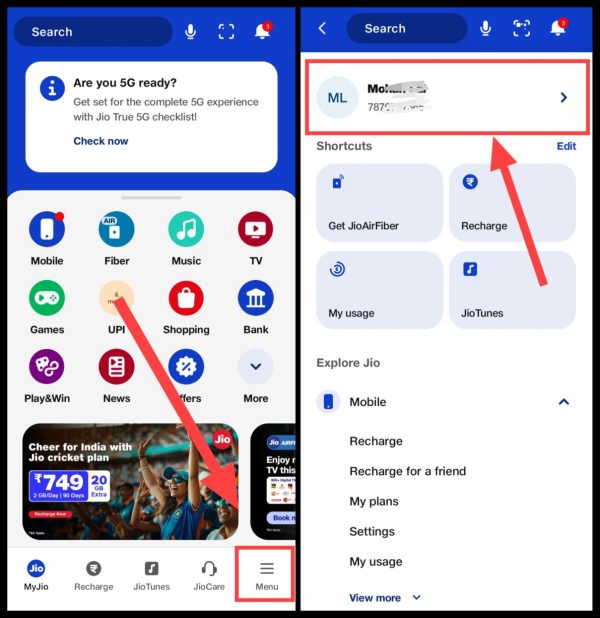
3Now the options given in front “Logout From All DevicesClick on “. Then after “Yes, LogoutTap on “.
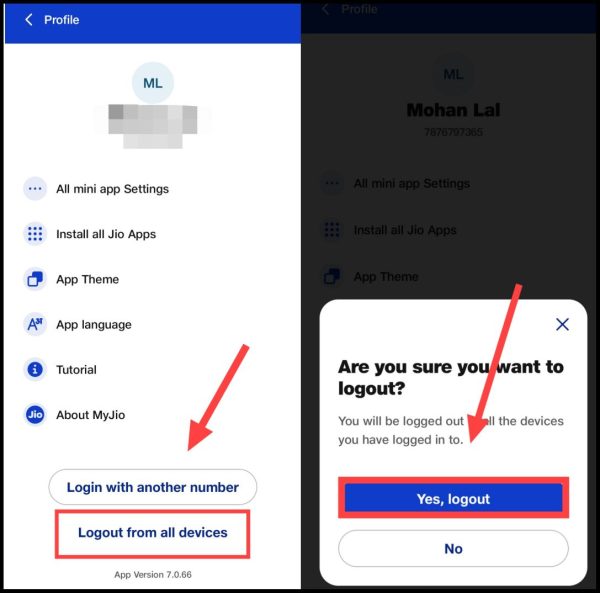
After this, your Jio account will be logged out from that other smartphone. Now he will not be able to see your call history.
Related questions
Any telecom company has to store call history for 18 months. However, after that he can delete your call history if he wants. Or they can store it for most of the time. It all depends on the telecom company.
No, you cannot delete call history automatically. For this you can take help of customer care. Apart from this, you can also request to delete the call history by mailing the telecom company.





![[FREE] Check Call History of Any Mobile Number Online](https://www.techtrends.blog/wp-content/uploads/2026/01/FREE-Check-Call-History-of-Any-Mobile-Number-Online.webp-330x220.webp)