
Nowadays online frauds have increased a lot, especially cases related to phone hacking. Hackers steal important information by hacking our phones and then misuse it, like withdrawing money from bank accounts or taking advantage of our identity.
Many times we do not even realize that our phone has been hacked, and by the time we understand, it is too late. Thousands of people are facing such problems every day in India. Therefore, we should be careful and keep the security of the phone strong, like using strong passwords, not clicking on unknown links and downloading only safe apps.
If you feel that someone has hacked your Android smartphone, then in today’s post we will know how to know whether the mobile is hacked or not?
Signs of mobile being hacked;
If your phone shows any of the symptoms mentioned below, it may be a sign that the phone has been hacked.
continuous shopping messages
Many times it happens that we start receiving messages about shopping transactions on our phone, although we have not done that transaction nor are we aware of it. Whenever this happens, it means that your credit card or debit card details have fallen into the hands of a hacker.
And he is trying to do transaction with your card, hence you get the notification again and again to enter the details in it. Hackers can get information about your payment details from shopping sites or from your phone and email.
phone slowing down suddenly
If your smartphone has started running very slowly and there is no technical fault in it. So you should be careful. Many times hackers use your phone for Bitcoin and trading platforms. This reduces the speed of your phone and may also cause loss of your data.
unnecessary data usage
Actually, the data usage of our phone depends on the usage of the phone. Because a lot of services keep running in our background. But with our regular data consumption, we know how much has been used.
If your phone is suddenly consuming more data and that too without any reason, then you have to be careful that this is a sign of the phone being hacked.
Responsive Popups and Ads
You open your phone or visit a website and suddenly suspicious popups or advertisements start appearing, the apps for which you have not allowed are appearing again and again while you are surfing the internet.
So you have to be alert, this is a sign of hackers hacking the phone. In such circumstances, the risk of theft of your personal data increases.
How to find out if your mobile is hacked?
There are many such applications on Google Play Store, through which you can find out whether your phone is hacked or not.
Step1: first of all you Spyware and Malware remover You have to download and install the application on your phone.
Step2: Now the home page of the application will open in front of you. You have to click on Scan for Spyware given in the middle there.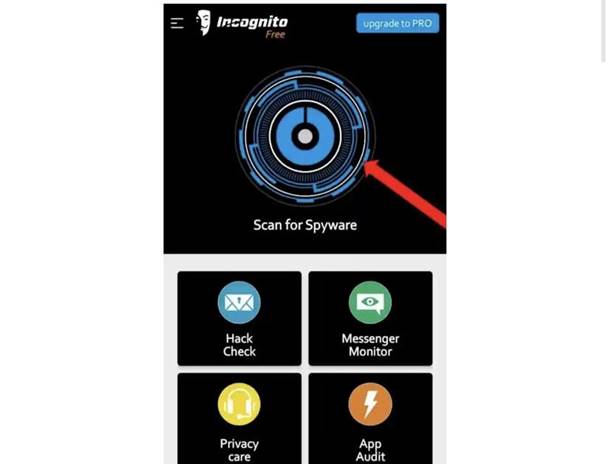
Step3: Now a Permission popup will appear in front of you. You have to grant permission by clicking on the Allow button.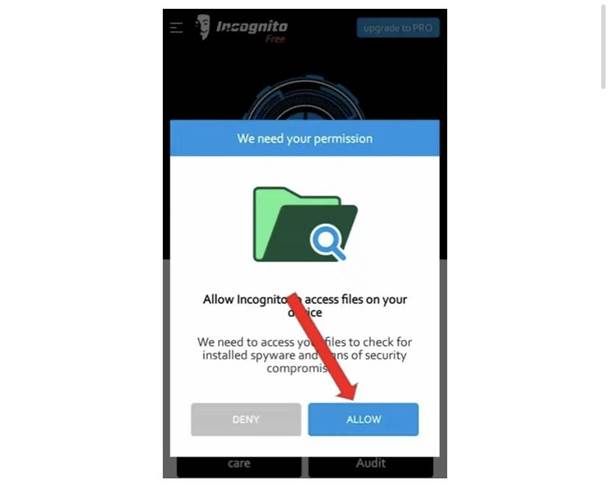
Step4: As soon as you get permission, your phone will start scanning. As you can see clearly in the photo shown below. Within a short time your phone will be completely scanned.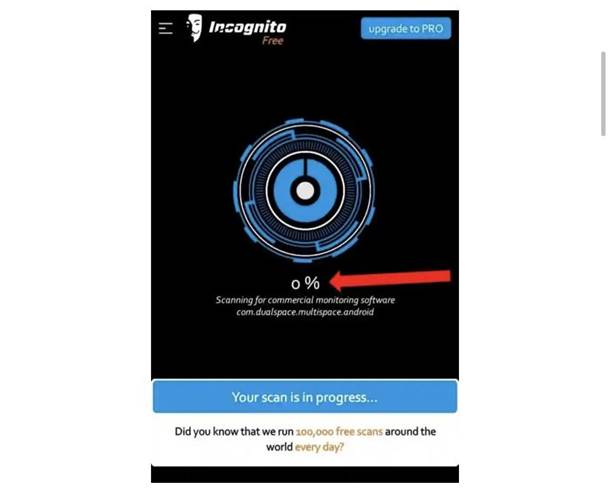
Step5: After the scan is complete, the option of Access your scan result will appear in front of you and 3 different options will be visible at the bottom. The first is Pae ₹100, the second is Reward Ads and the third and last is Upgrade pro.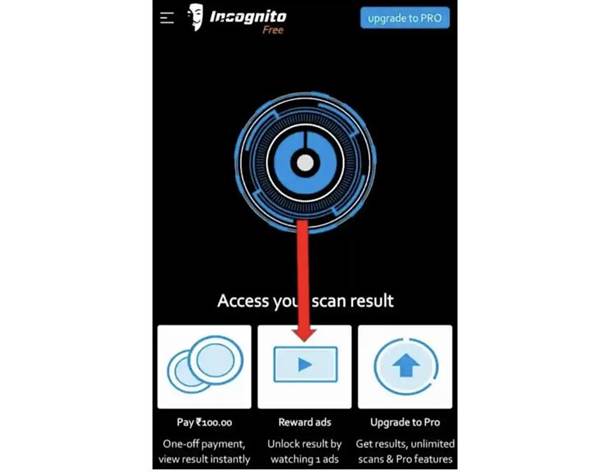
Step6: You have to select the second option i.e. Rewards ads. If your phone is not hacked then it will show No problem detected and if someone has hacked your phone, then after scan it will show Problem detected.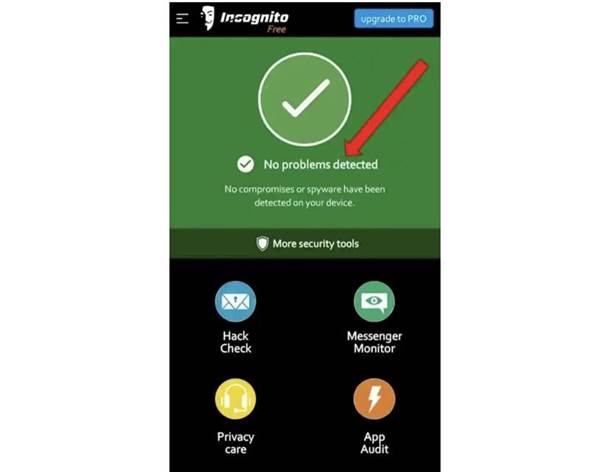
In this way, by following the process mentioned above, you can easily find out whether your phone is hacked or not, but you have to follow the step by step process.
It is also possible that the spy app installed in your phone may not be able to detect this application, in such a case you will have to manually check all the apps in your phone.
Related: How to know whether WhatsApp is hacked or not?
How to detect spy applications from phone settings?
Step1: First of all you have to go to the settings of your phone.
Step2: Then you have to go to the App option and click on manage app.
Step3: Inside Manage app, you will get the list of all the applications which are inside your phone, you have to check the application list.
Step4: If you find any item in the list unknown App Is visible, it means it could be a spy app. You have to open that app and uninstall it from your phone.
What are the reasons and mistakes that cause mobile hacking?
Below we will tell you the reasons why your mobile phone gets hacked. So that you do not make those mistakes and save your phone from getting hacked.
Installing unknown and fake apps:
Yes friends, the biggest mistake of most mobile users is that they store unknown and fake apps in their mobile. Which are not verified by Google Play Store and this becomes the biggest reason for mobile hacking.
Clicking on unknown links:
Many times many such links are sent to you through social media or messages. On which some lottery or attractive offers are given, the link on which everyone clicks very easily. Such links often become the biggest reason for our phones getting hacked.
Giving mobile phone to unknown person or someone:
When someone asks us for our mobile or someone else’s, then often all the users trust us and give their phone to that person. But it is possible that some people may download such a spy app or some hidden function in your mobile due to which all your data can reach them secretly. But don’t make this mistake and save your phone from getting hacked.
How to protect your mobile from being hacked?
use antivirus
Always keep a strong password
Do not share your OTP with anyone.
Do not give your mobile to anyone.
Always keep your phone updated.
Do not install 3rd party and unknown apps.
Avoid clicking on unknown links
Always install apps only after checking the permissions.
If you have any question or suggestion regarding the article, you can ask us by commenting in the comment box.
- Signs of mobile being hacked;
- continuous shopping messages
- phone slowing down suddenly
- unnecessary data usage
- Responsive Popups and Ads
- How to find out if your mobile is hacked?
- How to detect spy applications from phone settings?
- What are the reasons and mistakes that cause mobile hacking?
- Installing unknown and fake apps:
- Clicking on unknown links:
- Giving mobile phone to unknown person or someone:
- How to protect your mobile from being hacked?