The RAM of a computer or laptop can be increased in two ways. If you want to increase the RAM of your computer without spending money, then you should use virtual RAM. But the actual RAM of the computer does not increase through virtual RAM, it remains the same as before.
To increase physical RAM, you can increase the RAM of your device by installing a new RAM module in your device. For this, you can go to a nearby store and buy RAM for your computer or laptop and install it in your device.
In this post, we will understand both the methods step by step, how can we increase the RAM of any of our computer or laptop?
How to increase Virtual RAM of computer or laptop?
1: First of all press Windows Key in your laptop or computer. After this search About Your PC.
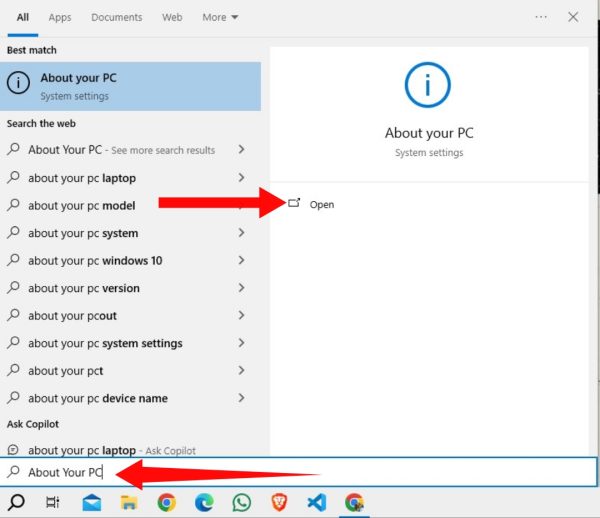
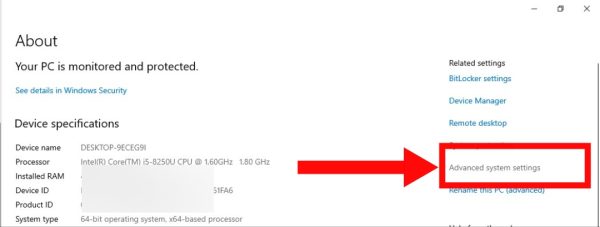
2: Now click on the Advanced System Settings option visible on the right side.
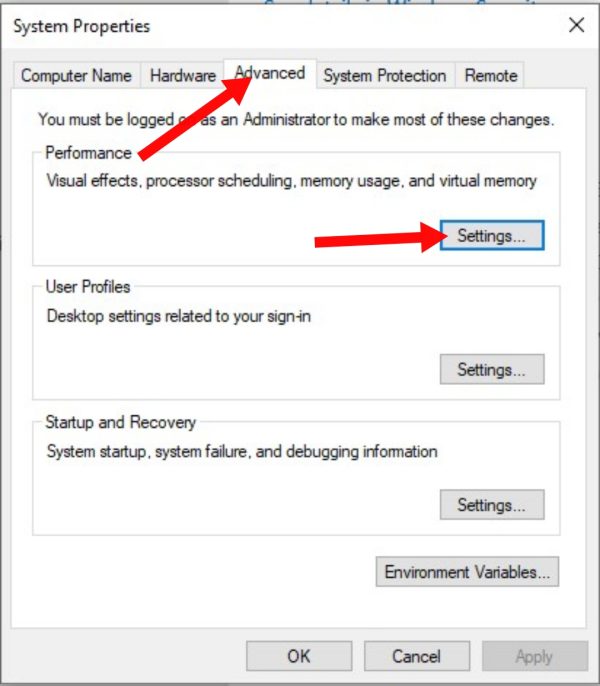
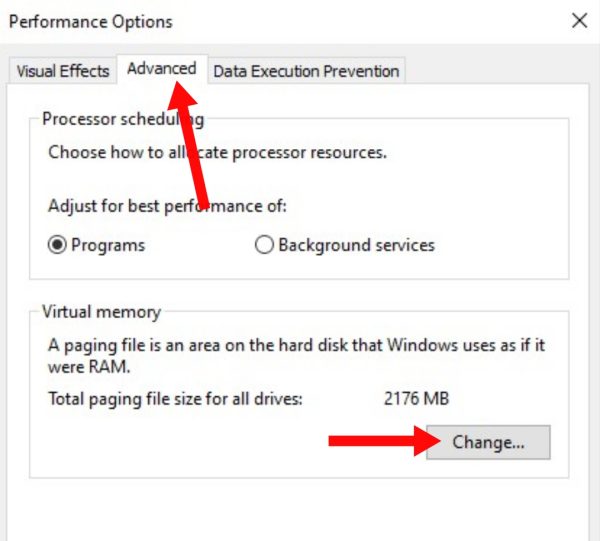
3: Now select it by clicking on the Advance button visible above. After this click on Settings… option.
4: Now select Advanced once again. After this click on Change option.
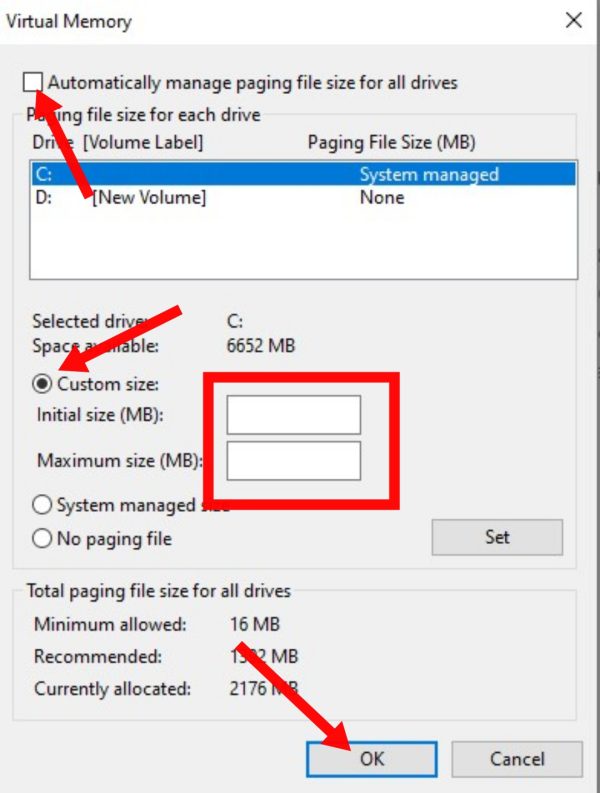
5: Now first of all uncheck the checkbox seen above. After this click on Custom Size. Now enter Initial Size and Maximum Size according to your storage.
6: This size is the size of your extra RAM. After entering, click on Set. After this click on the Ok button shown below.
Note: This is only a Virtual Ram. With this, the actual RAM of your device remains the same as before. But it also works like an actual RAM.
After doing this, make sure to restart your computer or laptop once. After this, the RAM of your computer or laptop will increase and your device will start working better than before.
How to increase physical RAM of computer or laptop?
1: Check Compatibilty
First of all, check how much RAM your computer can support.
2: Buy compatible RAM.
After this, go to any nearby laptop store or electronic store and buy RAM for your laptop or computer. Looks like a kind of chip.
3: Install RAM into the device.
Install the RAM module into the device by turning off your laptop completely and disconnecting all power.
Note: Although it is a simple process but if you are opening your device for the first time then it can be full of difficulty for you. Therefore, you can go to any laptop store and get this work done.
4: Test by powering on.
After installing the RAM, turn on your device. After the device boots up completely, you can check the RAM by going to Settings.
In this way you can easily increase the RAM of your computer or laptop, and make your device faster.
Also read;






![[NEW*] Computer TIPS & TRICKS in Hindi](https://www.techtrends.blog/wp-content/uploads/2026/01/NEW-Computer-TIPS-TRICKS-in-Hindi-330x220.jpg)