If you have forgotten the password on your memory card, SD card (chip), or you have a password protected memory card, and you want to crack its password, then today in this post I will tell you 2 ways to unlock any memory card. You can easily break the lock of any memory card from both your mobile and computer! Let us know how?
How to break memory card password from mobile?
Step1: First of all, you have to download and install ES File Explorer Pro app in your Android smartphone.
Download ES File Explorer/Manager PRO
Step2: After downloading and installing ES File Explorer Pro, switch off your phone, insert the locked memory card and turn on your phone.
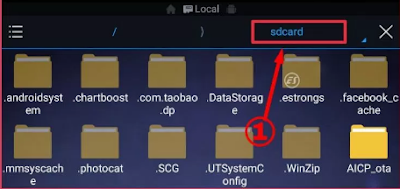
Step3: Open ES File Explorer Pro and click on Sdcard on the top right side.
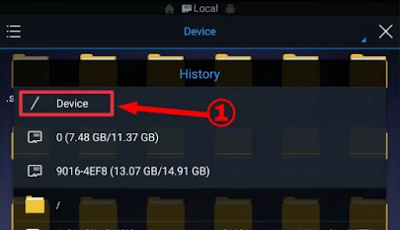
Step4: After clicking on Sdcard, now click on /Device.
Step5: Now Root Folder will be shown to you, now you have to search mmcstore.
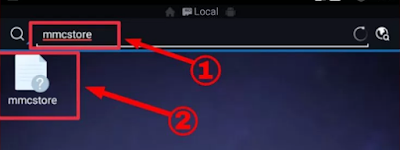
Step6: Now the file will be shown in front of you, open it with ES Note Editor.
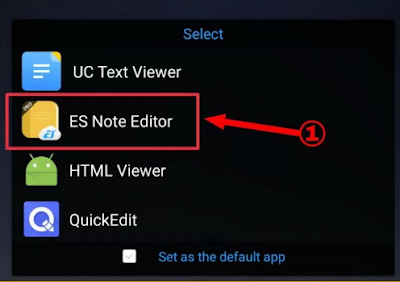
Step7: Now you will get the password of your memory card in us file.
So friends, in this way you can easily unlock any locked memory card from your Android mobile phone.
Now if you are facing any problem in this method, then you can use the other method mentioned below, but for that you must have a computer, laptop.
How to break memory card lock from computer?
Step1: First of all, insert your locked memory card in the card reader and connect it to your computer or laptop.
Step2: Now open Command Prompt in your computer. (press win + r & type cmd)
Step3: Now type the commands given below one by one;
diskpart

list disk

select disk 1 [esme aapko apne locked memory card ko select karna hai]

clean
Step4: Enter the commands mentioned above properly. You can enter cmd by looking at the image given below.
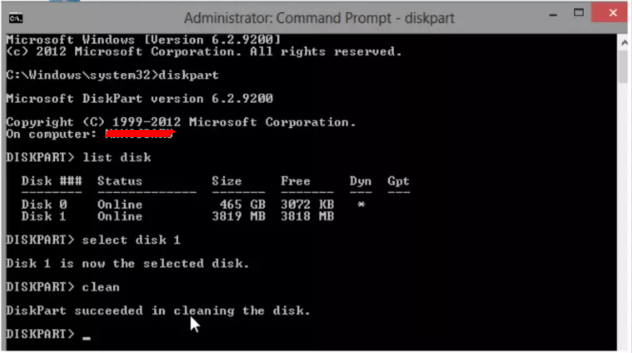
Now your locked memory card will be unlocked & formatted.
Also read;