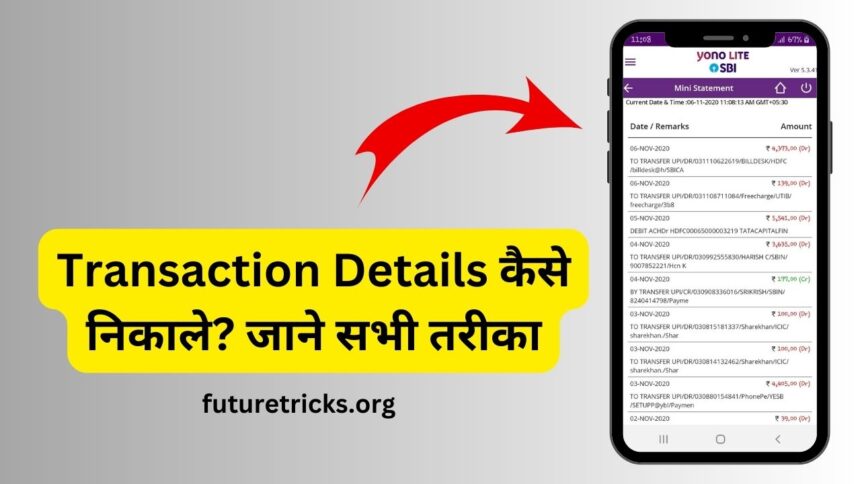
After making an online payment or transaction, you get a transaction ID, with the help of which you can easily get information related to that payment. In today’s post we will know what is this transaction ID? And how to extract details from any Transaction ID?
What is Transaction ID?
A transaction ID is a unique and identifiable number that is used to identify a transaction.
For example, if you have sent money to another person’s bank account through the Phone Pay application, then you get a transaction ID there, which you can use to know the payment details in case the money does not reach the other person’s bank account.
Transaction ID is in numeric type. It is used to verify the transaction or to update the transaction or to track the transaction.
Nowadays people use apps like PhonePe, Paytm and Google Pay to make online payments or transactions. Let us see how you can know the details from the transaction ID on this app.
How to get details from Paytm Transaction ID?
1: Login to Paytm application to get transaction details from Paytm transaction ID.
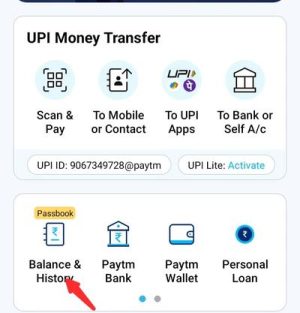
2: Now you will get the option of Balance and History under UPI Money Transfer section in the homepage, click on this option.
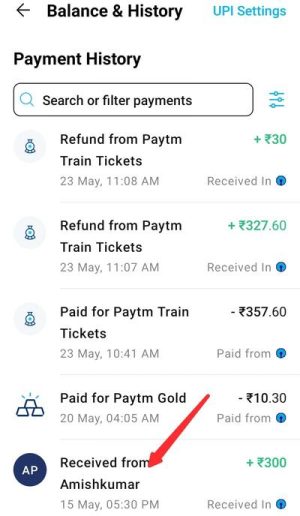
3: Now you have to come to the payment history section, below you can see all the transactions done by you. Click on the transaction for which you want to get the transaction ID.
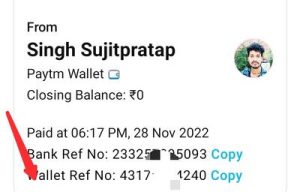
4: Now the wallet reference number that you see written here is the transaction ID. You have to copy this number.
5: Now you have to call Paytm Customer Care through the phone number on which your Paytm account is created. Paytm customer care number 0120-4456-456.
6: After calling Paytm customer care, following the prescribed procedure, you have to talk to the Paytm customer care officer and ask him to provide the details related to your transaction ID.
7: Now Paytm Customer Care will ask you to provide some important information. Under this, they can ask you information like your date of birth, Aadhar card number, father’s name, address etc.
8: You have to share all this information with Paytm customer care officer.9: The information given by you will now be verified by the Paytm customer care officer.
10: If your information passes the verification, then the Paytm customer service officer will provide you information related to the transaction ID over the phone itself.
In this way, by following the above procedure, you can get the details from Paytm Transaction ID.
How to get details from PhonePe Transaction ID?
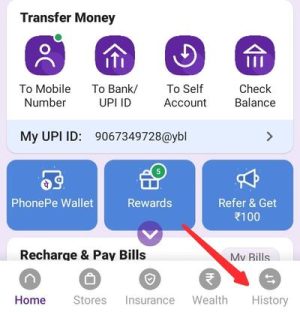
1: To get the transaction details from the transaction ID on the phone, first open this application and click on the History option shown below.
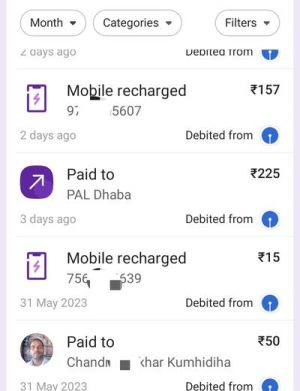
2: Now click on the transaction whose details you want to get.
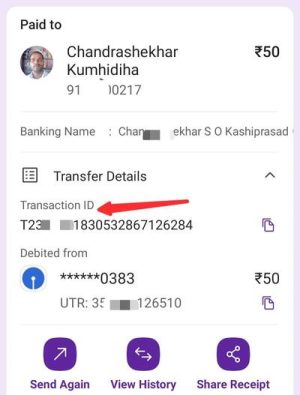
3: Now you will see the transaction ID on your screen. You have to copy it.
4: Now you have to come out of your phone completely and open the dialer pad of the mobile.

5: Now you have to dial 022-68727374 and call the customer care officer on your phone.

6: When the customer care executive picks up your call, you have to share the transaction ID that you have copied with him and ask him to provide the information related to this transaction ID.
7: Having said this, the customer service officer will ask you to share your name, your Aadhaar number, your father’s name and some other information.
8: You have to share all that information with the customer care officer.
9: Now the customer service officer will match all your information with his system. If your details are passed in matching, then the customer service officer will provide you whatever information is related to the transaction ID.
In this way you can easily get the transaction details from the transaction ID on your phone.
How to extract details from Transaction ID of Internet Banking?
1: To get transaction details from Net Banking Transaction ID, visit the official website of the bank for which you use Net Banking and login to the Net Banking account.
2: After logging into your net banking account, you have to click on the transaction or history option.
3: Now you see the list of money sent by you through net banking. You have to click on the transaction information you want to get.
4: Now you see the transaction ID of the respective transaction on your screen which you have to copy.
5: Now you have to call your bank’s customer care number or toll free number. You will get these numbers from the internet. Remember to make the call from the same number which is linked with your bank account.
6: Once the call is connected to the customer care executive, you have to share the relevant transaction ID with them and ask them to provide the transaction details.
7: Now the customer care officer will also ask you for some other information. Such as your name, your date of birth, full address, father’s name, Aadhaar number etc.
8: If the information given by you matches with the company’s system, then the customer care officer will provide you complete information about the related transaction ID.
In this way, net banking transaction details can be obtained or known through the above process.
What can you find out from Transaction ID?
You can know the following information from Transaction ID.Verification of process
With the help of Transaction ID, you can identify the transactions done by an account person or organization. This includes business transactions, banking transactions, cryptocurrency transactions and online transactions etc.
Through the transaction ID, it can be known to whom the transaction that has been done is related to. Like you have done a banking related transaction or you have done a transaction to make payment after doing online shopping.
Status and information
communication information
Transaction ID also provides you with message communication or other information about the process. Under this, you can get information about the name of the person sending the message or the name of the person receiving the message, type of message, information about the message, other information related to the message.
website transaction
There are many online platforms and services that use Transaction ID to easily identify and analyze transactions.
Using this, you can get information about online transactions as well as which goods have been purchased and how much payment has been made to purchase the goods. Along with this, you can also get information about payment for product or service etc.
Also read: