![[FREE] How to call block number? (easy way)](https://www.techtrends.blog/wp-content/uploads/2026/01/FREE-How-to-call-block-number-easy-way.webp.webp)
When someone is angry with us, he often blocks our number out of anger. It is possible that you may have blocked someone’s number, or someone may have blocked your number. If your number is blocked, there is no need to worry. There are some methods and websites that can help you call back the person who has blocked you. For this you will have to follow some easy steps. Let us understand step by step how to call any blocked number?
How to call any blocked number online for free?
Step 1: first of all you Globfone Have to go to the website of.
Step 2: After coming to the home page of the site, you have to scroll the page a little and look down. Call Click on that option.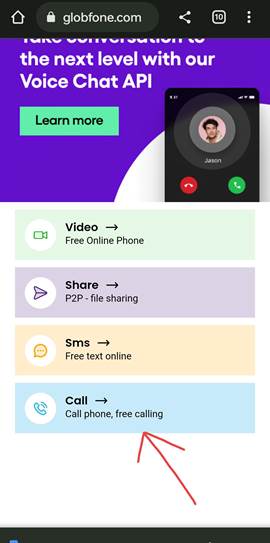
Step 3: Now here you have to select India in the country.And after that, in place of the mobile number shown below, you have to enter the number of the person who has blocked you, or any number on which you want to call.
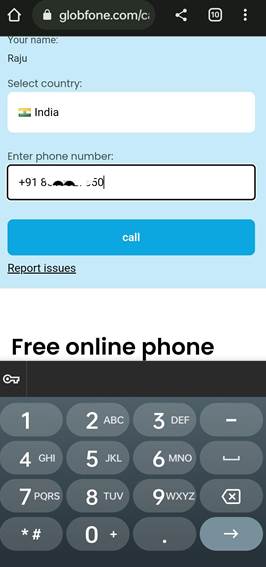
As soon as you call in this way, the call will be made to the blocked number from a new number, after which you will be able to easily talk to the person who has blocked your number.
If this website does not work then you can try other methods mentioned below.
How to call blocked number from Any Call App?
1. First of all Any Call App You will have to install it in your mobile.
2. After installing the app, when you open it, you will get the privacy policy, you have to accept it.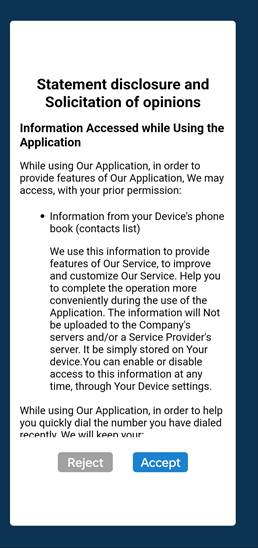
3. After this, you will be asked for permission to make this app the calling app of your phone, then give the permission by clicking on the Allow button.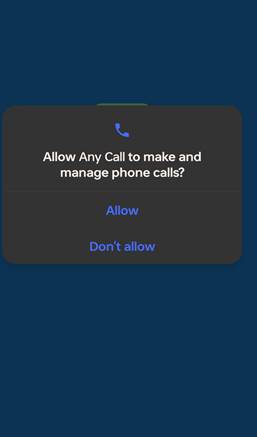
4. After giving this permission, the terms & privacy page of the application will open in front of you. Here you have to scroll down a bit on that page and click on the blue color accept button.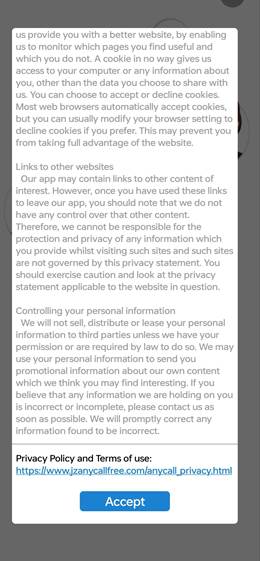
5. Now this type of page will open in front of you, then you have to click on the skip button visible on the top right side.
6. As soon as you click on that skip button, a page will open in front of you where you can dial the phone number on which you want to call, meaning you can enter the number of the person who has blocked you.
7. After entering the number, you have to directly click on the call button shown below.
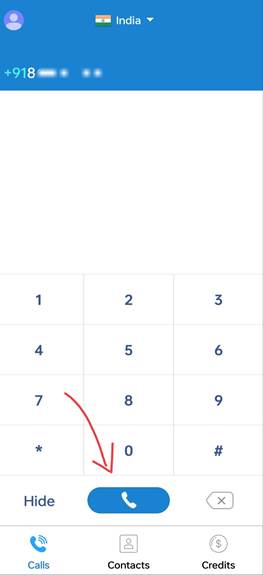
As soon as you click on this button, your call will be connected and you will be able to talk to the person who has blocked your call from the new number.
Also read;