The default language of WhatsApp is English but people living in India prefer to communicate in Hindi language only. If you also want to write in Hindi on WhatsApp, then in today’s post the easiest way to do Hindi typing on WhatsApp has been explained.
If you want to write in Hindi everywhere in your mobile, then how to do Hindi typing in mobile? You can read this post.
How to type in Hindi on WhatsApp?
Note: Although most of the people already have Google keyboard in their phones, but if your phone does not have it then install it in your phone before following the steps given below. GBoard Download the app.
1: First of all, open WhatsApp in your phone, and then open any chat.
2: Now you have to start typing any message to bring up the keyboard.
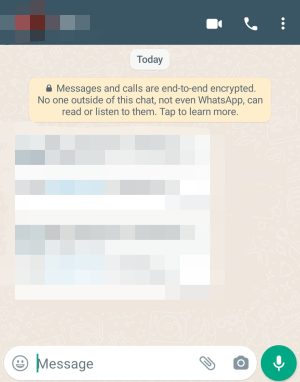
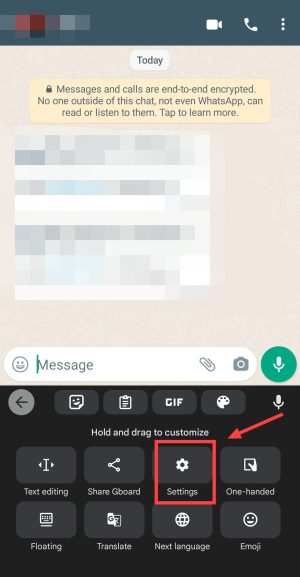
3: When the keyboard arrives, you have to click on the keyboard settings option.
To go to the keyboard settings, long press (hold for a while) the emoji button or the language button. Or you can also go to the phone’s settings and search for the keyboard settings.
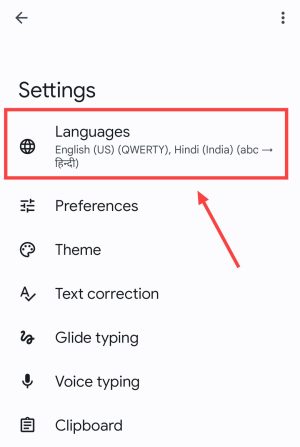
4: Now after coming to the settings of your keyboard, you have to click on the language option.
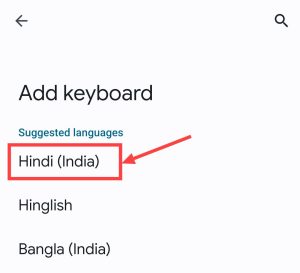
5: Now you will see the add keyboard option on your screen. After clicking on it you will see the language. Among these, you have to search for Hindi (India) language and once you find it, you have to click on the name of Hindi language.
6: Now the language and keyboard settings will open on your screen, where you have to click on abc->Hindi. Let us tell you that with its help, when you type any English word, it will be converted into Hindi. For example, if you write tum in English, it will be written as tum in Hindi.
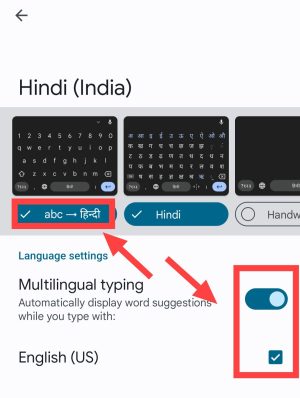
7: Now you have to look at the bottom side of the keyboard, there you will see the option to enable multilingual typing and English (UK). You have to enable that also and then press the done button.
8: Now you have to go directly to the WhatsApp application present in your smartphone and then open any chat and type the message. When you start writing the message, the keyboard will appear and as soon as you click on the space bar and hold it for a while, the option to convert the keyboard will appear on your screen.
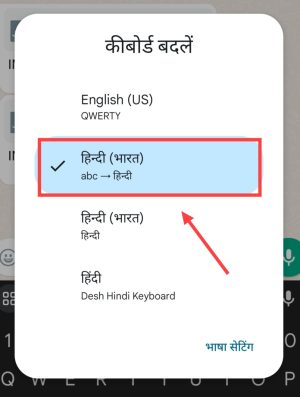
9: After the option to convert the keyboard appears, you have to select Hindi in it. After this, the keyboard on your screen will remain English but as soon as you type in English, it will automatically convert to Hindi.
Then you will be able to send messages in Hindi to anyone on WhatsApp very easily.
Also read: