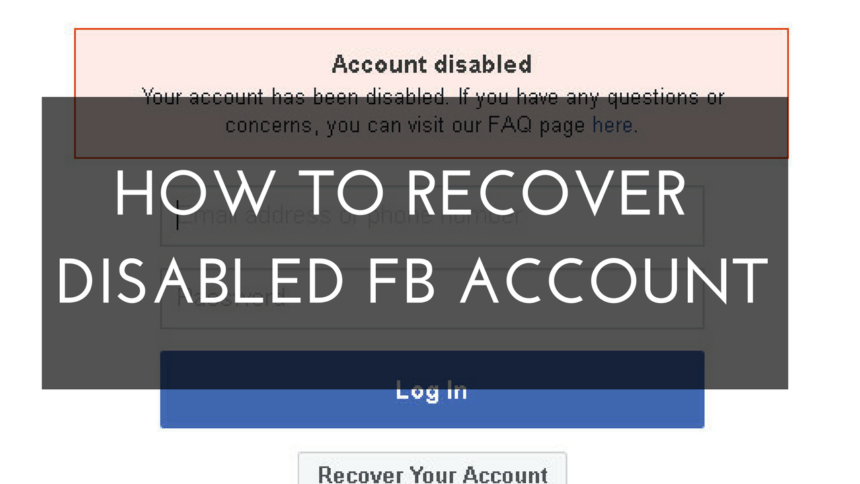
If for any reason your Facebook account has become disabled, then in today’s post I will tell you 2 ways to open any disabled Facebook account!
In today’s time, Facebook has crores of users, and day by day Facebook is increasing its security, hence even your small mistake or carelessness can get your Facebook account disabled.
How to open disabled Facebook account?
Friends, if Facebook has disabled your account, then there is no guarantee that your account will be opened. But still today in this post I am telling you 2 working methods, which you can try.
Step1: First of all, login with your disabled Facebook account, and go to the Facebook appeal page from the link given below.
Step2: Now a page like this will open in front of you,
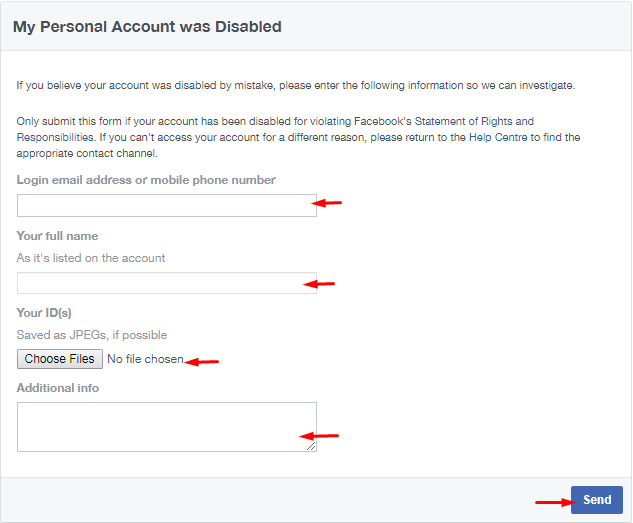
- Enter the email address or phone number linked to your disabled Facebook account.
- Enter your full name;
- Upload any of your ID proof.
You can upload these ID’s in your ID.
- Aadhaar Card
- Birth certificate
- Voter ID card
- Driver’s license
- Passport
- Marriage certificate
- Change of name affidavit
- Personal or vehicle insurance card
- Ration card
- PAN card
- Tribal identification or status card
What Types of ID does Facebook accept?
Step3: In Additional Information, you can request Facebook to recover your account.
Now you have to wait for 24 hours to 7 days. Now if you have sent everything correctly then your Facebook account will be opened within 7 days.
Now if your Facebook account is not opened by this method then you can try the 2nd method.
Although the method mentioned above should open your Facebook account back, but if it does not happen then you can also try the 2nd method mentioned below.
Another way to open disabled Facebook account
This is an alternative method to open a disabled Facebook account. If your method #1 does not work, you can try this method.
Step1: First of all, login with your disabled Facebook account, and go to Facebook contact page from the link given below.
Step2 Now a page like this will open in front of you,
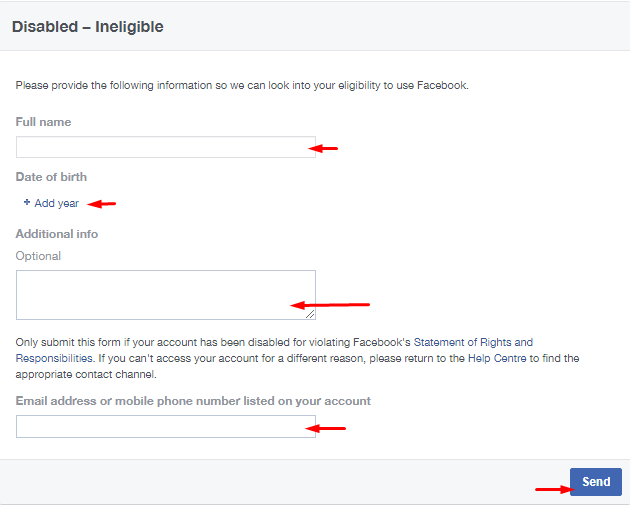
- Enter your full name.
- Choose your date of birth. (The same DOB which is in the Facebook account has to be chosen here.)
- In Additional Info, you can make a request to Facebook to recover your account.
- Enter the email address or phone number linked to your disabled Facebook account.
then click on send button! Now you have to wait for 24 hours to 7 days. Now if you have sent everything correctly then your Facebook account will be opened within 7 days.
So friends, these are the 2 ways by which you can open your disabled FB ID.
Also read;





![[FREE] How to increase followers on Instagram? (Real Followers)](https://www.techtrends.blog/wp-content/uploads/2026/01/1767630200_FREE-How-to-increase-followers-on-Instagram-Real-Followers-330x220.png)

![[BEST] Facebook Stylish Names 2025 (Girls & Boys)](https://www.techtrends.blog/wp-content/uploads/2026/01/BEST-Facebook-Stylish-Names-2025-Girls-Boys-330x220.jpeg)