
If you have forgotten your Realme mobile password, you can unlock your phone in two ways. In the first method, you use the Forgot Password option, in which you have to answer the security questions set by you. In this way your phone will be unlocked and your mobile data will remain safe, nothing will be deleted.
In the second method, you will have to hard reset your phone by taking it to Recovery Mode. Keep in mind that performing a hard reset completely formats your mobile, which means all the photos, videos, contacts and other data present in your phone’s internal storage will be deleted. Therefore, before doing a hard reset, if possible, save your important data somewhere.
In this post, we will tell you in simple language how to break the lock of Realme mobile in both the ways so that you can use your phone again.
How to break Realme mobile lock with Forgot Password?
Forgot password option is not available on the lock enter screen in any Realme mobile. For this you have to keep entering wrong passwords continuously for some time. After this you will see the option of Forgot Password on the screen.
1: First of all click on the Forgot Password button. Then click on the Security Question option.
2: After this, Security Question will appear on your mobile screen. Here you answer your question. After this click on the Unlock button.
Note: You must have set this question while creating your Google account. Whatever answer you entered at that time, fill it here.
3: After this click on Yes button to set a new password for your mobile. Now set password, PIN or pattern for the mobile.
4: After some time your mobile will be completely unlocked.
How to unlock Realme mobile from recovery mode?
1: First of all switch off your Realme mobile. After this, to take the mobile to recovery mode, long press Power Key + Volume Down Key.
2: After this you will see the realme logo. Now release the Power Key and keep holding the Volume Down Key.
3: Now select the English language using the Power Key. Now you will see Realme UI Recovery on the mobile screen.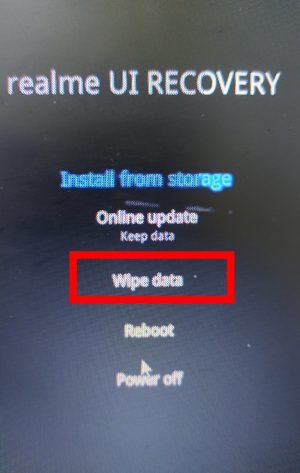
Note: During Recovery Mode, use Volume Up Key and Volume Down Key to move the cursor up and down. And use Power Key to click on the option.
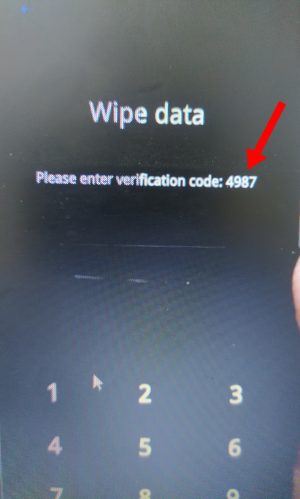
4: After this you click on the Wipe Data button. After this the verification code will appear on your screen. Enter this verification code.
5: After this click on the Format Data button. After this, click on the Format button in the pop up screen. After the process is completed, click on the Ok button.
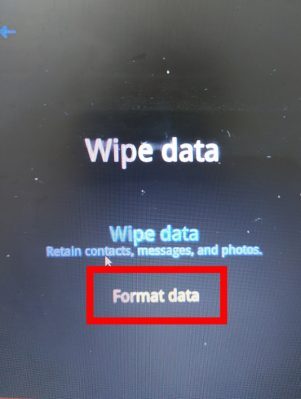
6: After doing this your realme device will reboot automatically. Now complete the set up of your mobile. Your realme mobile is completely unlocked.
In this way you can break the password of any of your realme mobile.
Also read: