In this post, two methods of downloading YouTube videos (YouTube Se Video Kaise Download Kare?) have been explained, using any method you can easily download any YouTube video (Full Video or YouTube Shorts) in HD and that too in your mobile’s gallery.
Many times it happens that we like a YouTube video and we want to download it so that we can watch it offline later. But when you download a video from YouTube app, that video remains only in YouTube app and does not come in the gallery. But by following the steps given below, you will be able to easily download any YouTube video into the gallery. After that you will be able to share that video with anyone through WhatsApp or any other app.
This article has been written for educational purposes only. Please note that according to YouTube’s rules, download only those videos that you have the right to download. It is illegal to download or use copyrighted material without permission.
How to download any video from YouTube?
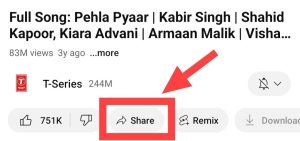
1: First of all, open any YouTube video or YouTube short you want to download and then click on the share icon ⏩ coming below.
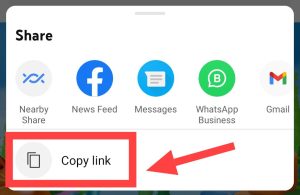
2: Now you will see a copy link option. You have to copy the link of that video by clicking on it.
3: now you y2mate Go to the website of and paste that link.
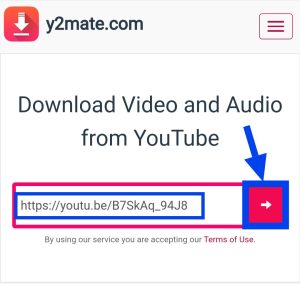
4: After pasting the link of the video in the empty box, you have to click on the arrow icon visible in the red box in front.
5: Now the download button of your video will appear on the screen of your device. You must be seeing different formats of videos on your screen. Click on the download button in front of the format in which you want to download the video, which will be in the green box.
If you want to download the video in Full HD, then click on the Download button next to the 1080p option.
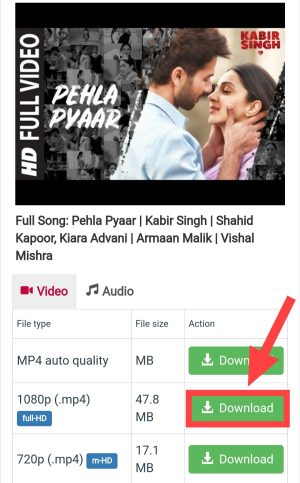
6: Now another download button will appear in a green box on your screen. Click on this also.
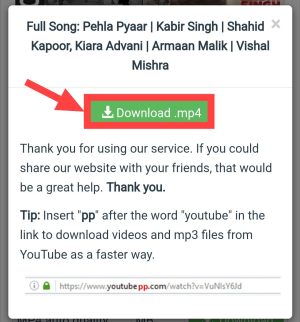
Now you have to sit peacefully because within a short time your favorite video will be downloaded and you will have it in your file manager or gallery.
Also read: How to download Mp3 Song from YouTube?
How to download video from YouTube? (From Vidmate App)
If the above method does not work, you can also download YouTube videos using Vidmate app on your phone.
1: First of all, download and install Vidmate App on your phone.
By clicking on the link given below, you have to go to Vidmate’s website and there you will be able to easily download Vidmate App by clicking on the red download button.
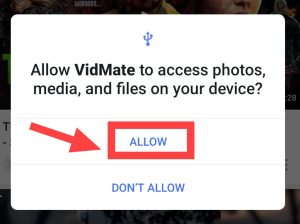
2: Now open the app and allow all the permissions.
3: Now you have to click on the YouTube option visible at the top.
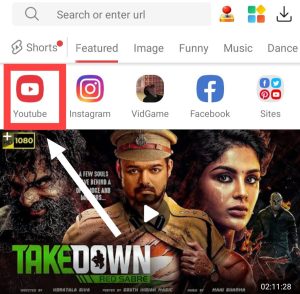
4: Now the YouTube platform opens on your screen. In the search option visible at the top, you have to search for the video you want to download.
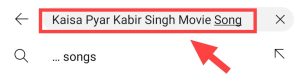
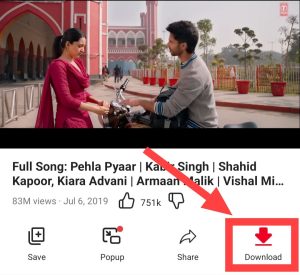
5: Now you have to open that video and then click on the download button below.
6: After clicking on the download button, different types of formats appear on your screen to download the video. Click on the format in which you want to download the video and then click on the download button shown below.
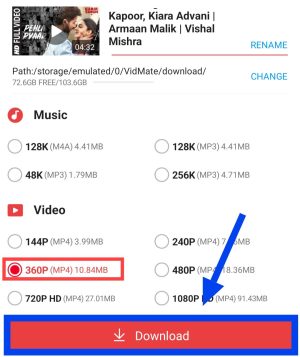
7: After clicking on the download button, your video starts downloading.
By just following these steps you will be able to easily download any YouTube video.
Also read: apps to download videos from youtube
Best apps and websites to download videos from YouTube
Although you will be able to easily download any YouTube video with the methods mentioned above, but still if you face any problem then you can also try the apps or websites mentioned below. The process of downloading videos is almost the same for everyone.
So these are some ways by which you can easily download any YouTube video (YouTube Video Download). Some time ago, YouTube videos could be downloaded by prefixing SS in the URL, but now that method no longer works. But you can download any YouTube video with the easy methods mentioned in this post.





![[NEW*] Airtel Free Data Code 2025 (101% Working & Tested)](https://www.techtrends.blog/wp-content/uploads/2026/01/NEW-Airtel-Free-Data-Code-2025-101-Working-Tested-330x220.jpg)