


If you want to book your train ticket online then you need an IRCTC account, in today’s post we will know how you can easily create your IRCTC account (ID) in just 1 minute.
To create a new IRCTC account, you will need a mobile number and email ID, provided that no IRCTC ID has been created before.
How to create IRCTC account (User ID)?
1) First of all, download and install IRCTC app on your phone.
2) After installing the app, open it, now you are asked for App permission, allow it.
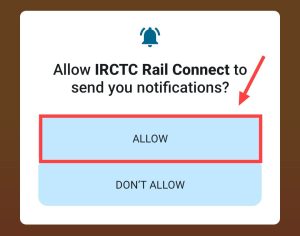
3) After allowing, Irctc app will open where you will have to create your account. For which click on the login option there.
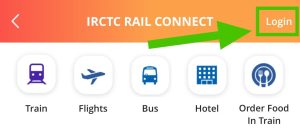
4) After clicking on the Login option, after signing up, click on where it is written Register User.
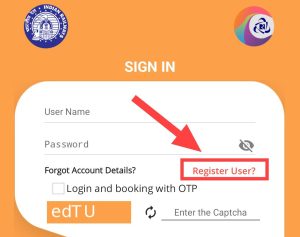
5) After clicking on Register User, a form will open, you have to enter the following information in the prescribed space inside the form and then press the Next button.
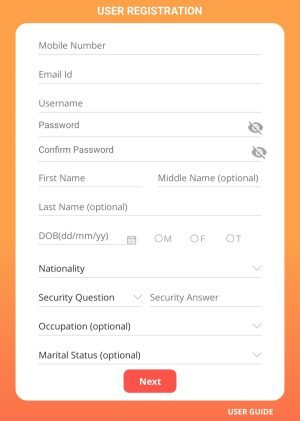
- Mobile no: Enter your phone number here.
- Email id: Enter your email ID here.
- Username: Enter a unique username here.
- Password: Enter the password for IRCTC ID here.
- Confirm Password: Re-enter the password you entered above here.
- First Name: Enter your full name here.
- Dob: Enter your date of birth, month of birth and year of birth here.
- Nationality: Select your citizenship (India).
- Security Question: Select security question.
- Security Answer: Answer the security question.
- Occupational: Do not make any changes here.
- Marital Status: Nothing changed here either.
6) After clicking on the Next button, a next page appears on your screen in which you need to enter some information, which is as follows.
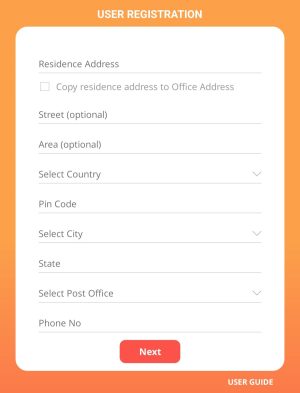
- Resident Address: Here you have to enter your complete address.
- Street: Don’t make any changes here.
- Area: You do not have to make any changes here also.
- Select Country: You have to select your country here.
- Pin Code: Enter the pin code of your area here.
- Select city: Select the name of your city here.
- State: Enter the name of your state here.
- Select post office: Select your post office.
- Phone no: Enter your phone number here.
7) Now through the application it will be verified whether you are a robot or not. After that your account will be successfully created. Now you can login directly by entering your username and password.
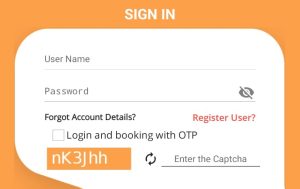
8) Now you have to enter Username and Password. After that you have to login by entering the captcha.
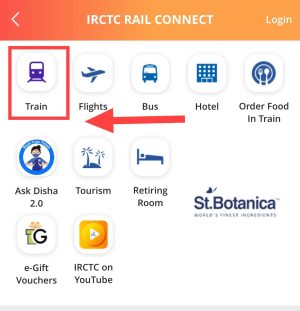
9) Now you have to click on “Train” to book a train from IRCTC. After that you have to click on “Book Ticket”.
10) Now select FROM STN the station from where you want to go. After that select where you want to go in To STN.
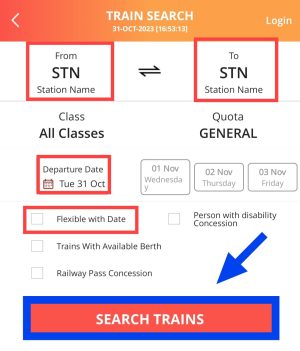
11) Now you have to choose Departure Date. After that tick mark Flexible With Date. Then you have to click on “Search Train”.
12) Now you can easily see and book trains.
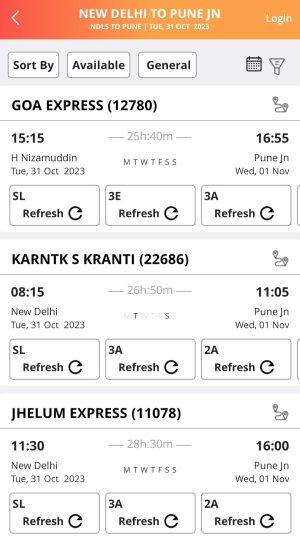
So in this way you can create your IRCTC account very easily and login to it. And you can also book any train ticket.
If you want to understand the complete process of booking train tickets step by step, then how to book train tickets online? Read this post from.






![[FREE] How to call block number? (easy way)](https://www.techtrends.blog/wp-content/uploads/2026/01/FREE-How-to-call-block-number-easy-way.webp-330x220.webp)
![[30 FREE] Telegram Channels for Movies & Web Series 2025](https://www.techtrends.blog/wp-content/uploads/2026/01/30-FREE-Telegram-Channels-for-Movies-Web-Series-2025.webp-330x220.webp)
![[NEW*] VI Free Data Code 2025 (101% Working & Tested)](https://www.techtrends.blog/wp-content/uploads/2026/01/NEW-VI-Free-Data-Code-2025-101-Working-Tested.webp-330x220.webp)